Page Builder: Rearchitecting Content Discovery for Flexible, Audience-First Knowledge Sharing

Company

Bloomfire

Bloomfire

Category

Category

Knowledge Management

Knowledge Management

Date

2022 and 2025

2022 and 2025

My Role

Lead Product Designer

Lead Product Designer

Users said content wasn't relevant to them. Admins felt powerless to fix it. The real problem wasn't the homepage design — it was that a single shared homepage couldn't serve organizations with fundamentally different internal audiences. I designed the solution in two phases: first Homepage Builder, a customizable homepage that saw strong early adoption, then Boards, an entirely new content type that I championed and designed from the ground up.

The Problem Beneath the Problem

Bloomfire is a knowledge management platform used by organizations to share and discover internal content. On the surface, users were complaining that content wasn't relevant to them. But the real problem ran deeper.

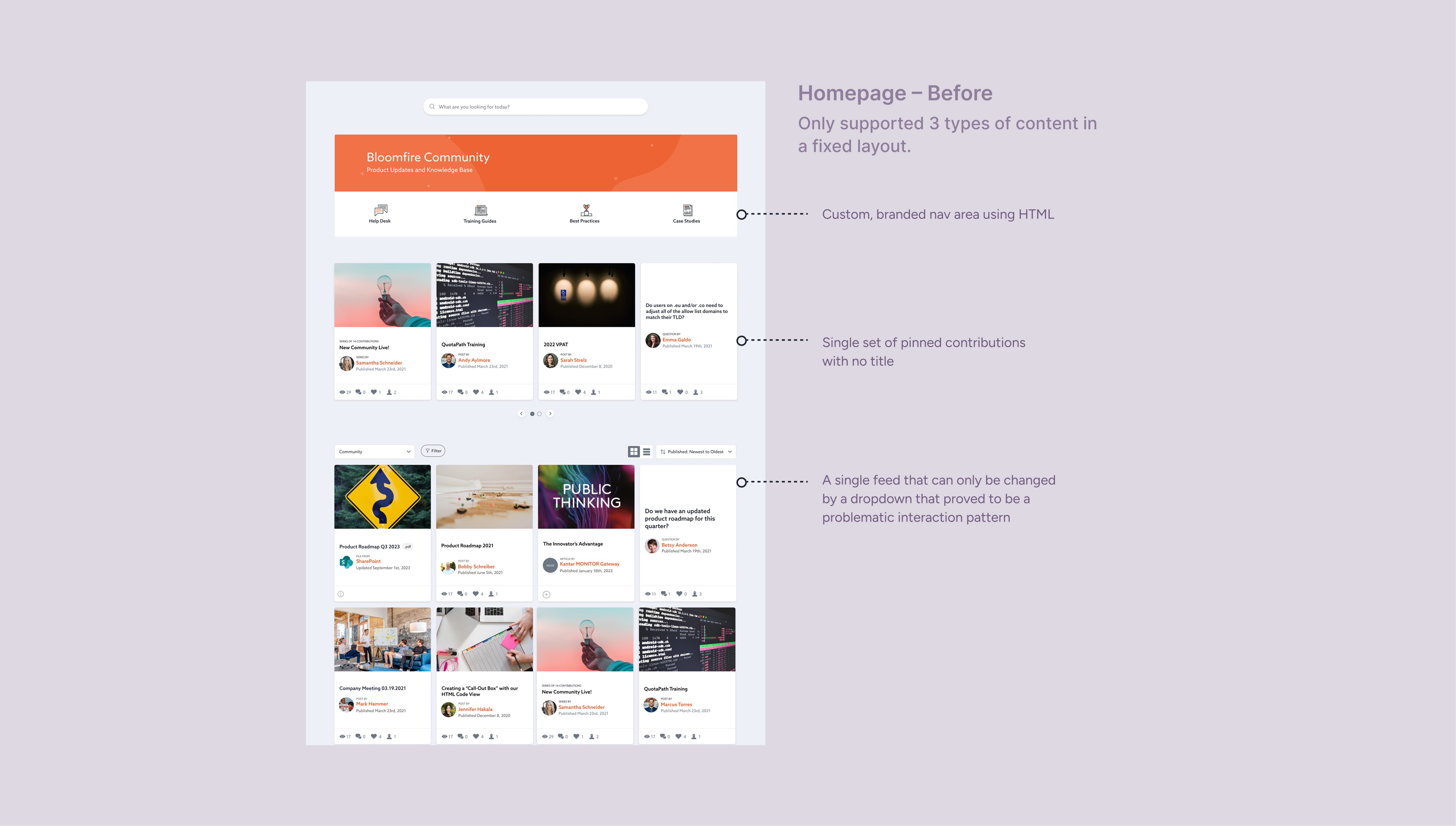
The platform assumed every user in an organization had the same needs — and served them a single, shared homepage to prove it. There was a dropdown that could filter content by group, but it was easily missed, its state wasn't obvious when changed, and most users didn't know they weren't seeing everything. The interface was obscuring an information architecture problem rather than solving it.

For organizations with genuinely different audiences — sales teams, HR, customer success, engineering — a single homepage wasn't just unhelpful. It was actively eroding trust in the platform. Users stopped looking for things. Admins felt powerless to surface what mattered to the right people at the right time.

Phase 1: Homepage Builder — Proving the Concept

The Insight

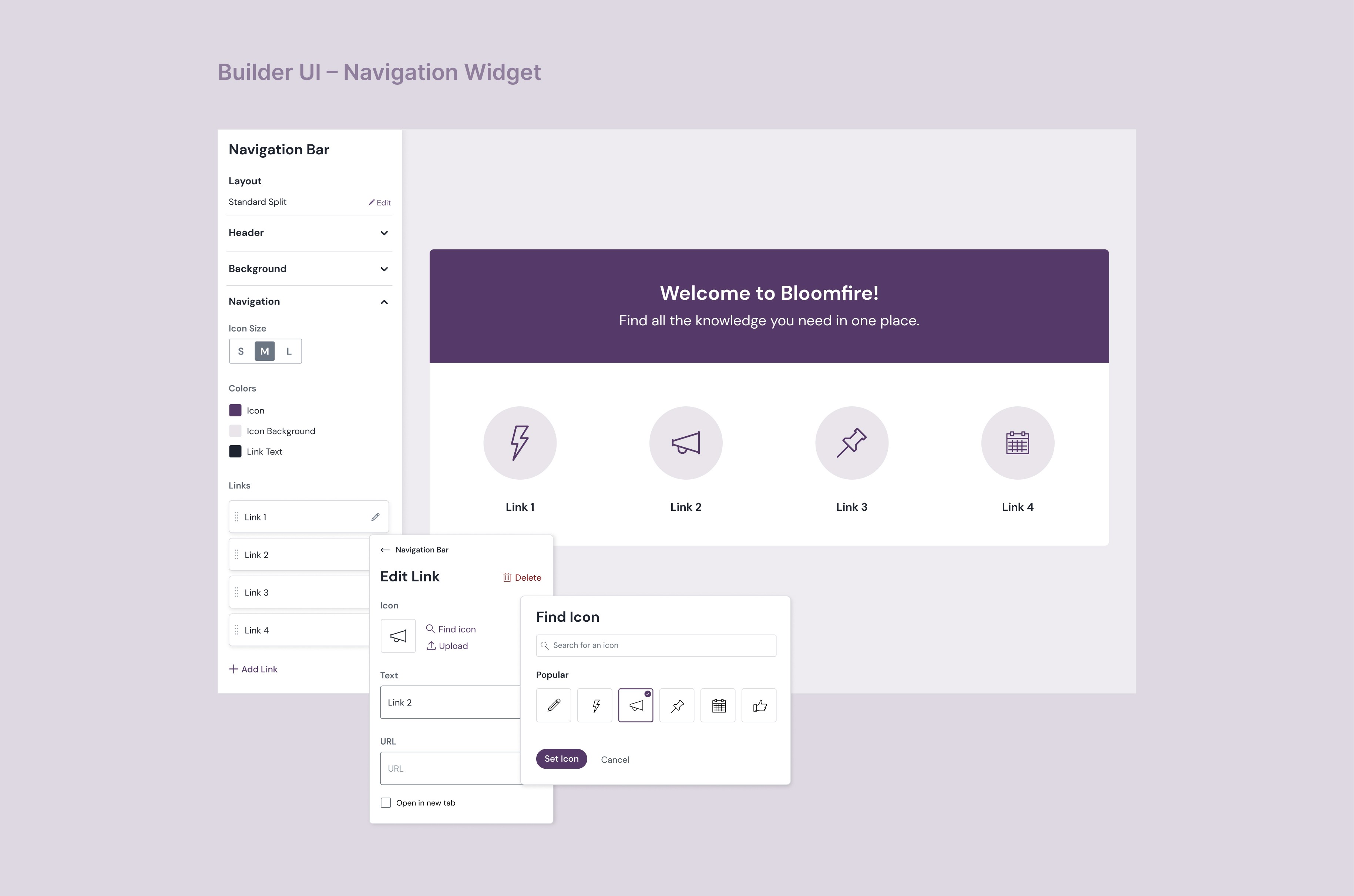
After customer interviews and internal research, a clear pattern emerged: admins didn't need a homepage redesign. They needed control — the ability to decide what their users saw, organized around how their organization actually worked.

The constraint was building this without starting from scratch. We had existing components — card views, list views, and a feeds feature (custom content streams built on filtered criteria) that hadn't seen strong adoption. Rather than design around them, I saw an opportunity to give feeds the context and discoverability they were missing by surfacing them directly on the homepage.

The Design Decisions

I designed Homepage Builder around three principles:

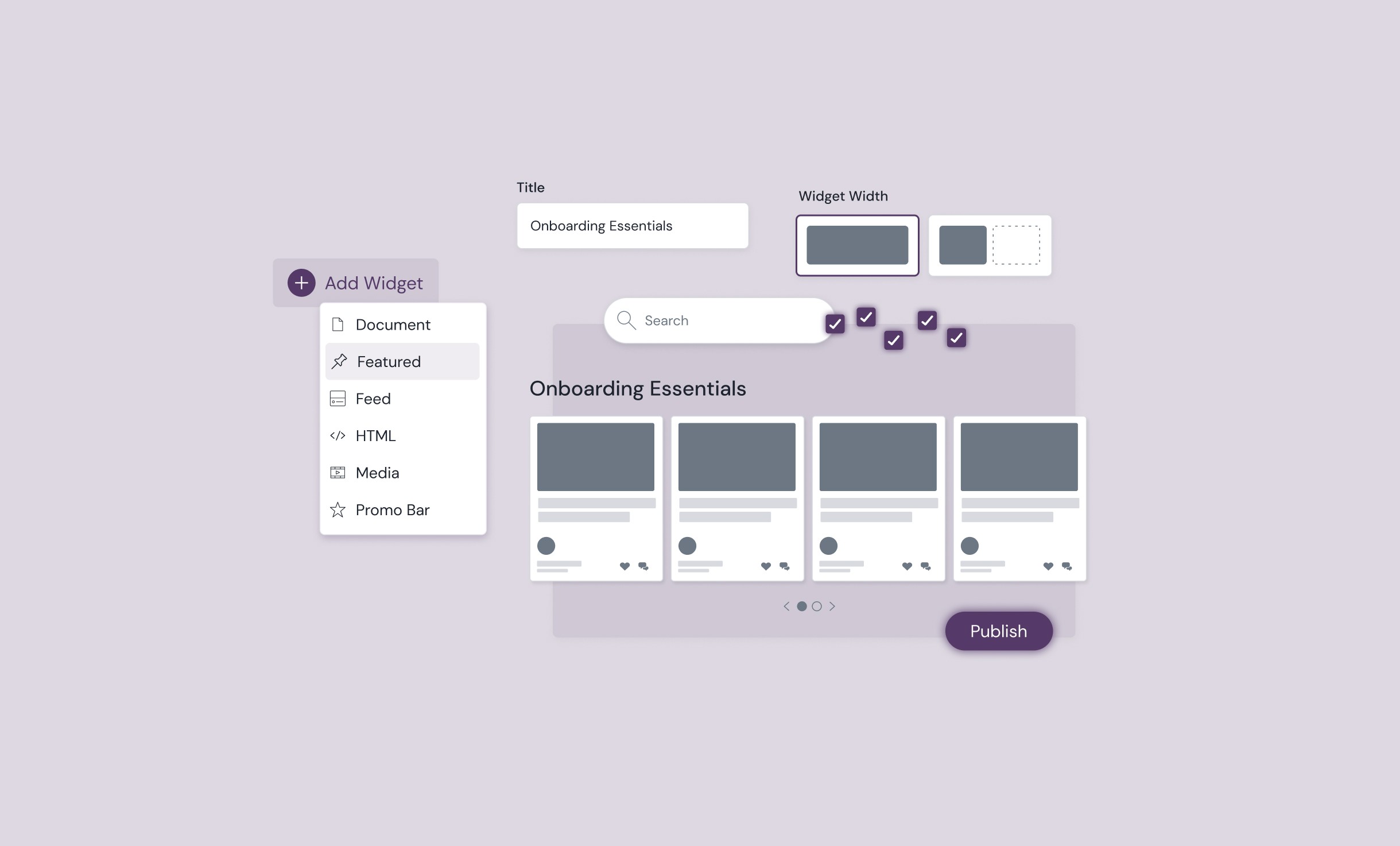
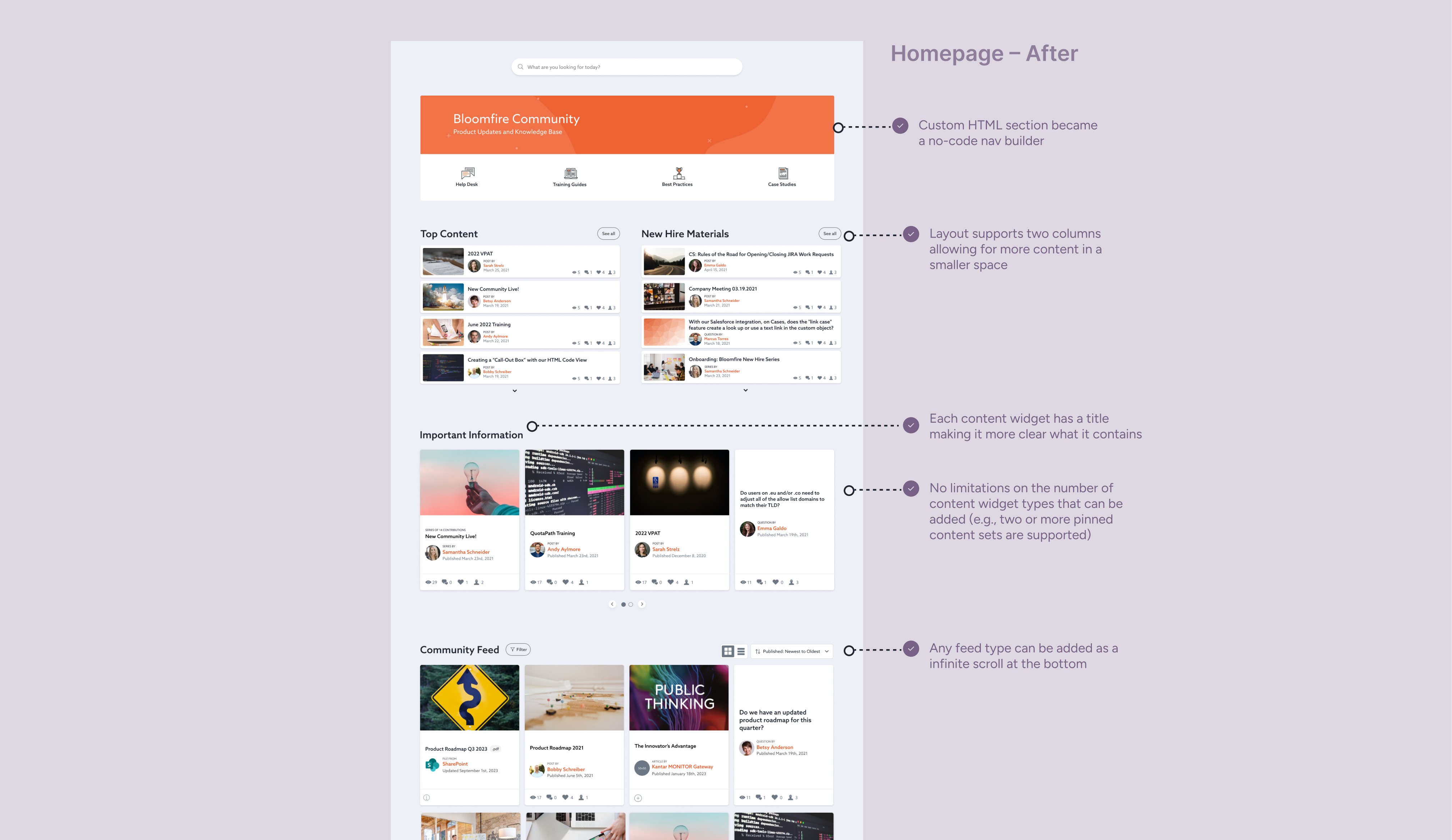
Reuse what works, fix what doesn't. Rather than designing new card components, I used the existing list view and positioned two instances side by side — introducing a two-column layout without requiring new UI patterns. Admins could compose their homepage from familiar building blocks.

Give feeds a front door. I designed a new page template type that allowed a feed to be previewed on the homepage with a "see more" link to its dedicated page. Suddenly feeds had context, discoverability, and a reason to exist. A feature that had struggled in isolation became a cornerstone of the new system.

Multiple spotlights, not one. Admins had previously been limited to a single set of pinned content. Homepage Builder introduced multiple featured content sections — so a seasonal campaign, a new hire resource, and a team announcement could all coexist.
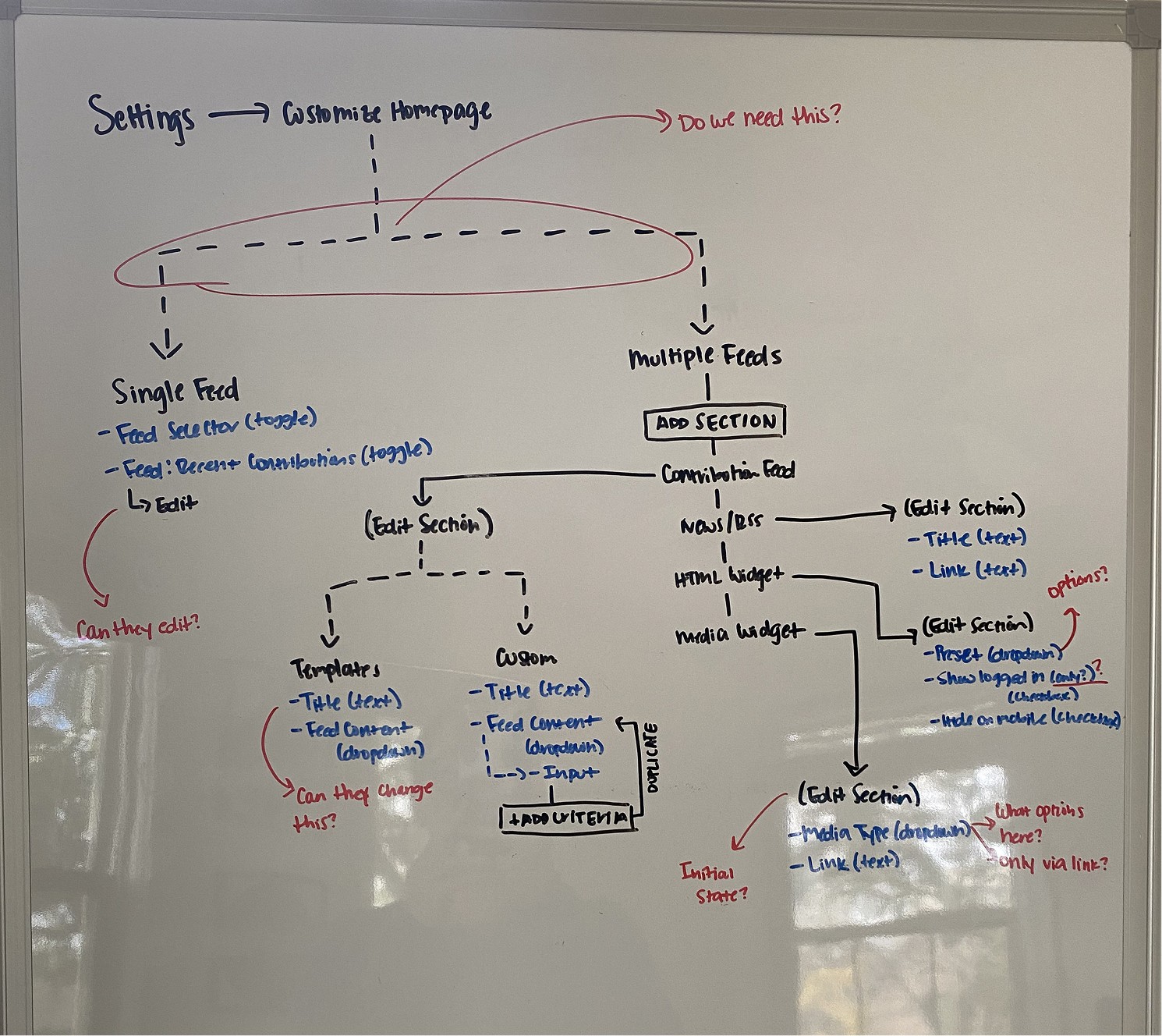
Good old whiteboarding to map out the flow, help guide conversations, and align the team.

The Outcome: 23% of target users were actively exploring Homepage Builder just within the first week of launch. By a year out, over 80% had tried it.

Over the following year, it became standard practice — most accounts I visited in customer conversations had it actively in use. In fact, if a customer didn't have it in use it seemed strange. This validated the direction clearly enough that leadership greenlit the next, more ambitious phase.

But success also revealed the ceiling. Homepage Builder gave admins more control over one homepage. What organizations actually needed was many destinations.
Phase 1: Homepage Builder — Proving the Concept

The Insight

After customer interviews and internal research, a clear pattern emerged: admins didn't need a homepage redesign. They needed control — the ability to decide what their users saw, organized around how their organization actually worked.

The constraint was building this without starting from scratch. We had existing components — card views, list views, and a feeds feature (custom content streams built on filtered criteria) that hadn't seen strong adoption. Rather than design around them, I saw an opportunity to give feeds the context and discoverability they were missing by surfacing them directly on the homepage.

The Design Decisions

I designed Homepage Builder around three principles:

Reuse what works, fix what doesn't. Rather than designing new card components, I used the existing list view and positioned two instances side by side — introducing a two-column layout without requiring new UI patterns. Admins could compose their homepage from familiar building blocks.

Give feeds a front door. I designed a new page template type that allowed a feed to be previewed on the homepage with a "see more" link to its dedicated page. Suddenly feeds had context, discoverability, and a reason to exist. A feature that had struggled in isolation became a cornerstone of the new system.

Multiple spotlights, not one. Admins had previously been limited to a single set of pinned content. Homepage Builder introduced multiple featured content sections — so a seasonal campaign, a new hire resource, and a team announcement could all coexist.

Good old whiteboarding to map out the flow, help guide conversations, and align the team.

The Outcome: 23% of target users were actively exploring Homepage Builder just within the first week of launch. By a year out, over 80% had tried it.

Over the following year, it became standard practice — most accounts I visited in customer conversations had it actively in use. In fact, if a customer didn't have it in use it seemed strange. This validated the direction clearly enough that leadership greenlit the next, more ambitious phase.

But success also revealed the ceiling. Homepage Builder gave admins more control over one homepage. What organizations actually needed was many destinations.
Phase 1: Homepage Builder — Proving the Concept

The Insight

After customer interviews and internal research, a clear pattern emerged: admins didn't need a homepage redesign. They needed control — the ability to decide what their users saw, organized around how their organization actually worked.

The constraint was building this without starting from scratch. We had existing components — card views, list views, and a feeds feature (custom content streams built on filtered criteria) that hadn't seen strong adoption. Rather than design around them, I saw an opportunity to give feeds the context and discoverability they were missing by surfacing them directly on the homepage.

The Design Decisions

I designed Homepage Builder around three principles:

Reuse what works, fix what doesn't. Rather than designing new card components, I used the existing list view and positioned two instances side by side — introducing a two-column layout without requiring new UI patterns. Admins could compose their homepage from familiar building blocks.

Give feeds a front door. I designed a new page template type that allowed a feed to be previewed on the homepage with a "see more" link to its dedicated page. Suddenly feeds had context, discoverability, and a reason to exist. A feature that had struggled in isolation became a cornerstone of the new system.

Multiple spotlights, not one. Admins had previously been limited to a single set of pinned content. Homepage Builder introduced multiple featured content sections — so a seasonal campaign, a new hire resource, and a team announcement could all coexist.

Good old whiteboarding to map out the flow, help guide conversations, and align the team.

The Outcome: 23% of target users were actively exploring Homepage Builder just within the first week of launch. By a year out, over 80% had tried it.

Over the following year, it became standard practice — most accounts I visited in customer conversations had it actively in use. In fact, if a customer didn't have it in use it seemed strange. This validated the direction clearly enough that leadership greenlit the next, more ambitious phase.

But success also revealed the ceiling. Homepage Builder gave admins more control over one homepage. What organizations actually needed was many destinations.

Phase 2: Boards — The Architectural Solution

The Insight That Drove It

Customers had been asking for this for a long time. Customer service managers regularly fielded requests on their behalf, and in my own interviews the excitement was consistent: organizations didn't just want a better homepage. They wanted dedicated spaces for different audiences, teams, and topics that felt like first-class destinations — searchable, permissioned, and built to last.

Homepage Builder was a proof of concept. Boards was the real answer.

What Boards Are

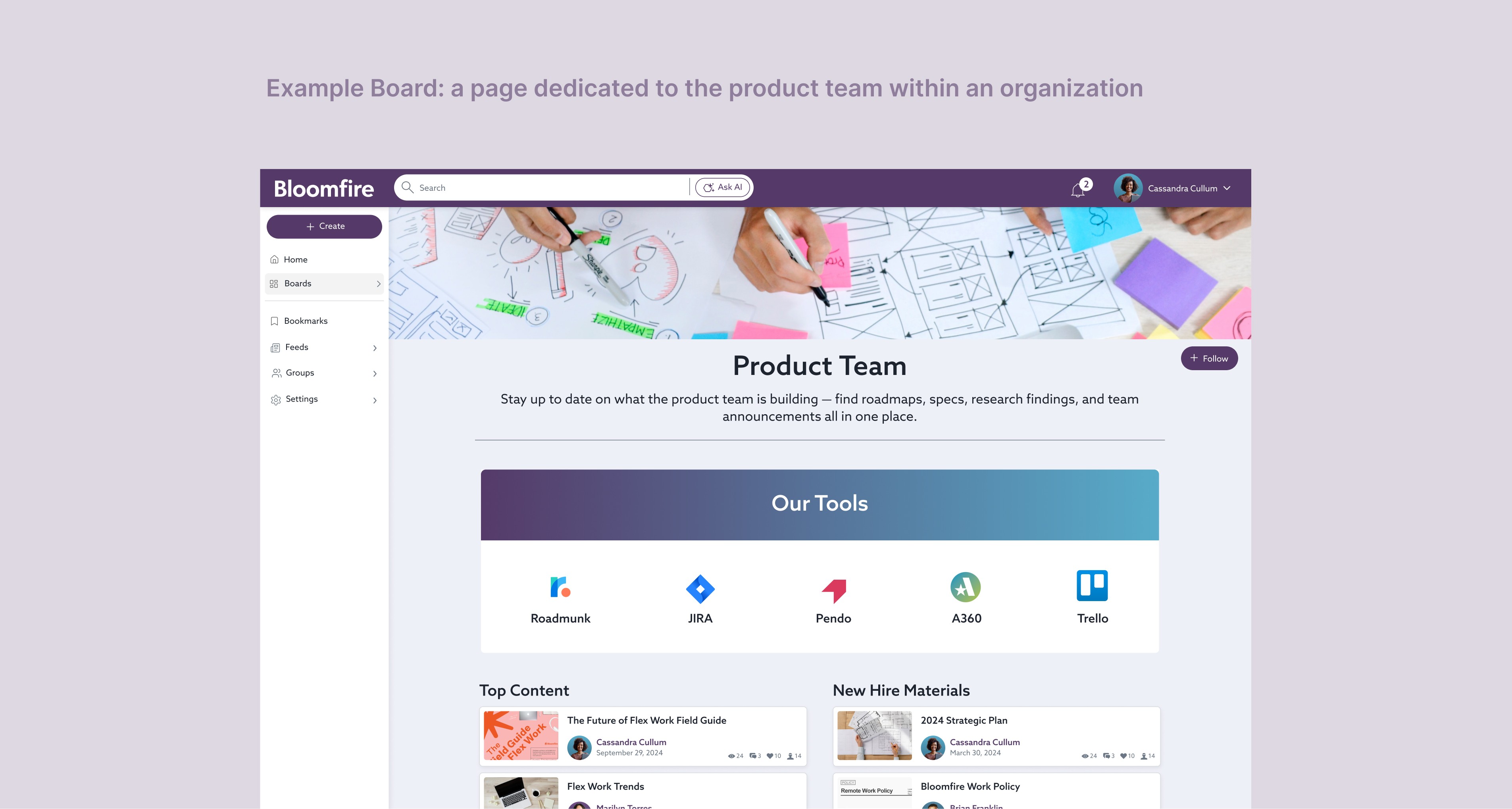
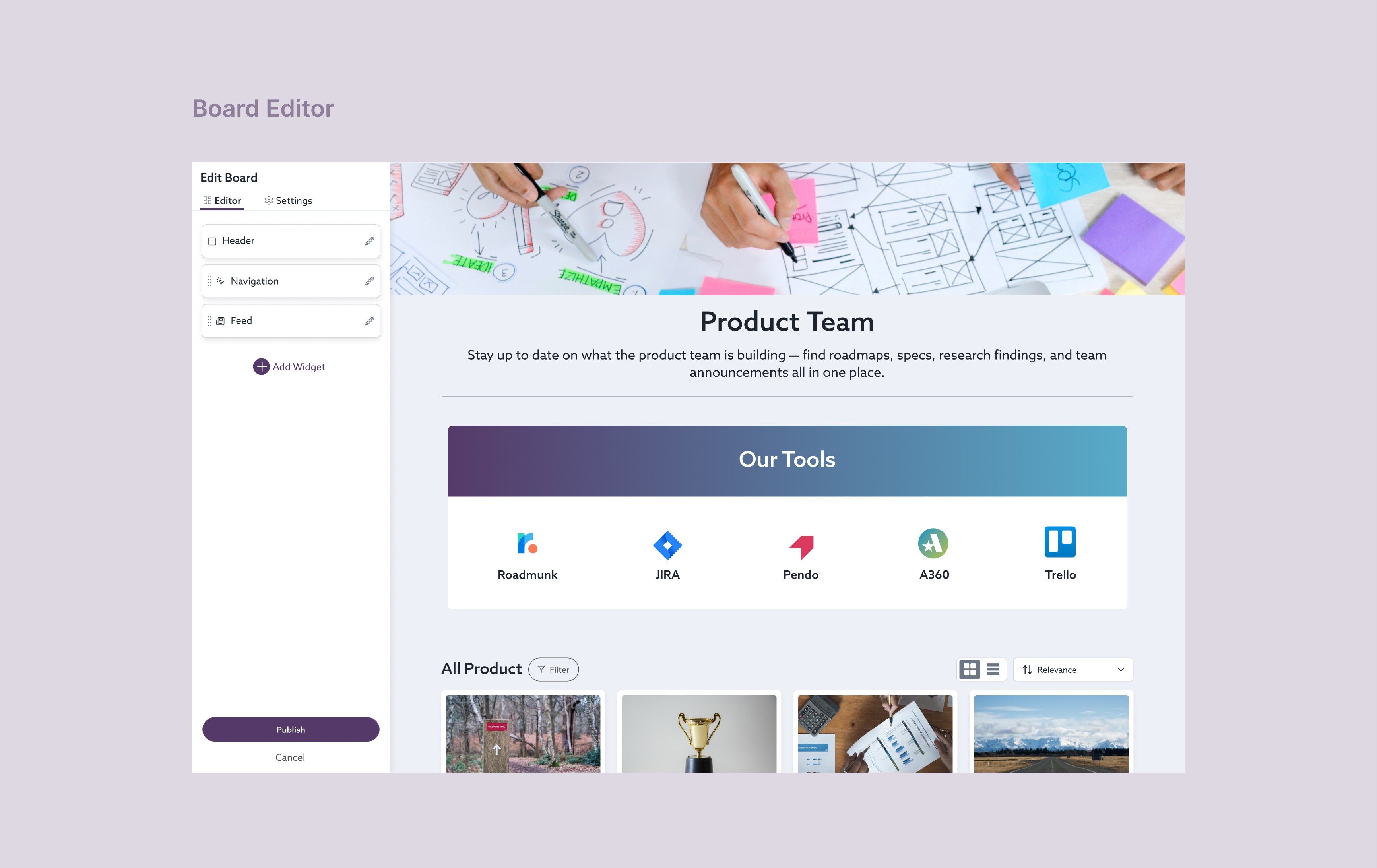
Boards are a new content type in Bloomfire — individual pages that carry the full compositional power of Homepage Builder, plus:

  • A name, cover photo, and description that make each Board feel like a real destination

  • Public or private permissions so the right audiences see the right content

  • Full search visibility — Boards surface in results, so users can find them without being told where to look

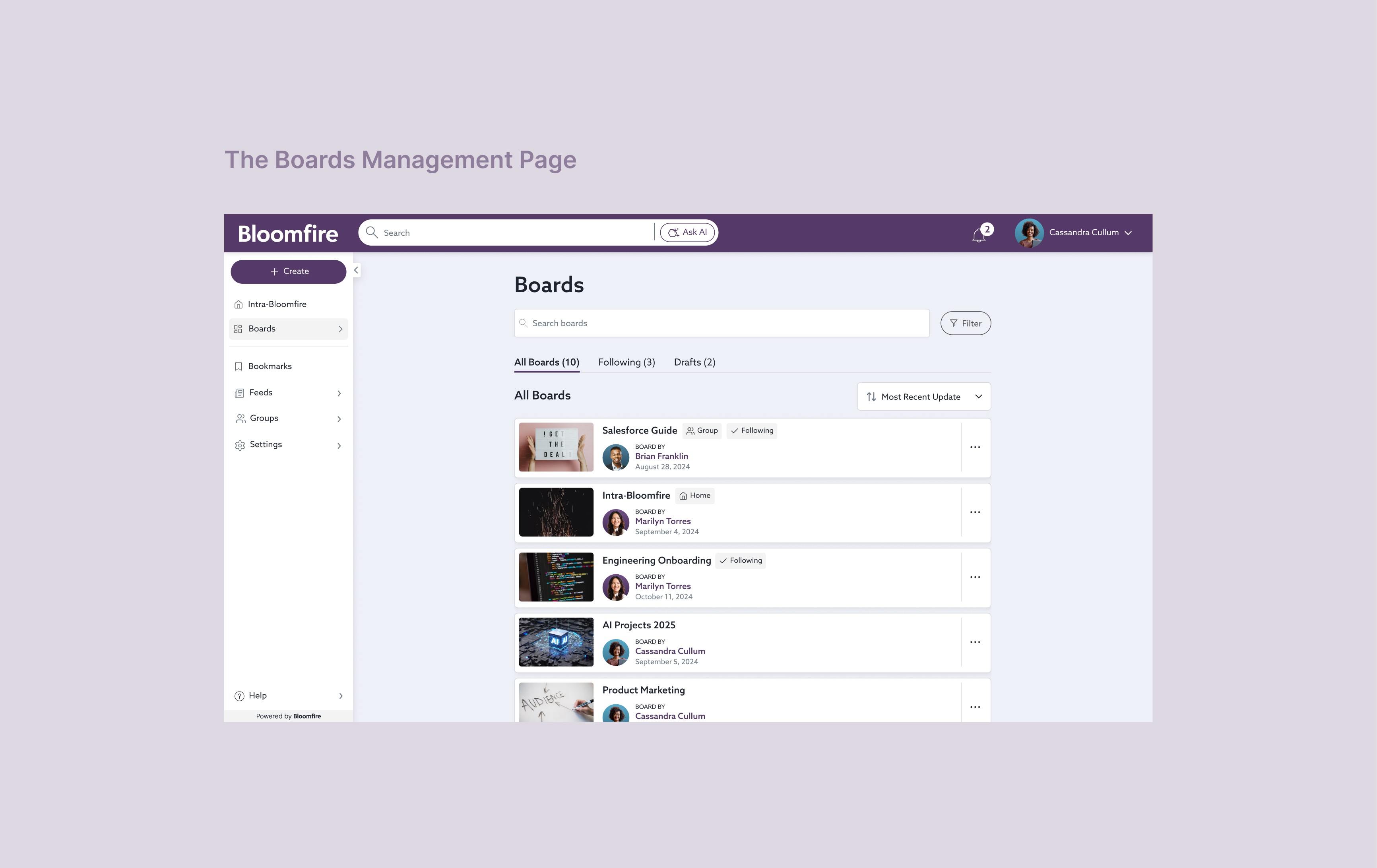
  • A dedicated spot in the nav, elevated above the rest

The homepage itself became the home Board — familiar to admins who had used Homepage Builder, but now one node in a larger network of destinations rather than the single entry point.

Solving Discoverability — and Learning From the Past

Feeds had failed partly because users couldn't find them — no search visibility, no notifications, no natural entry point. I was determined not to repeat that with Boards.

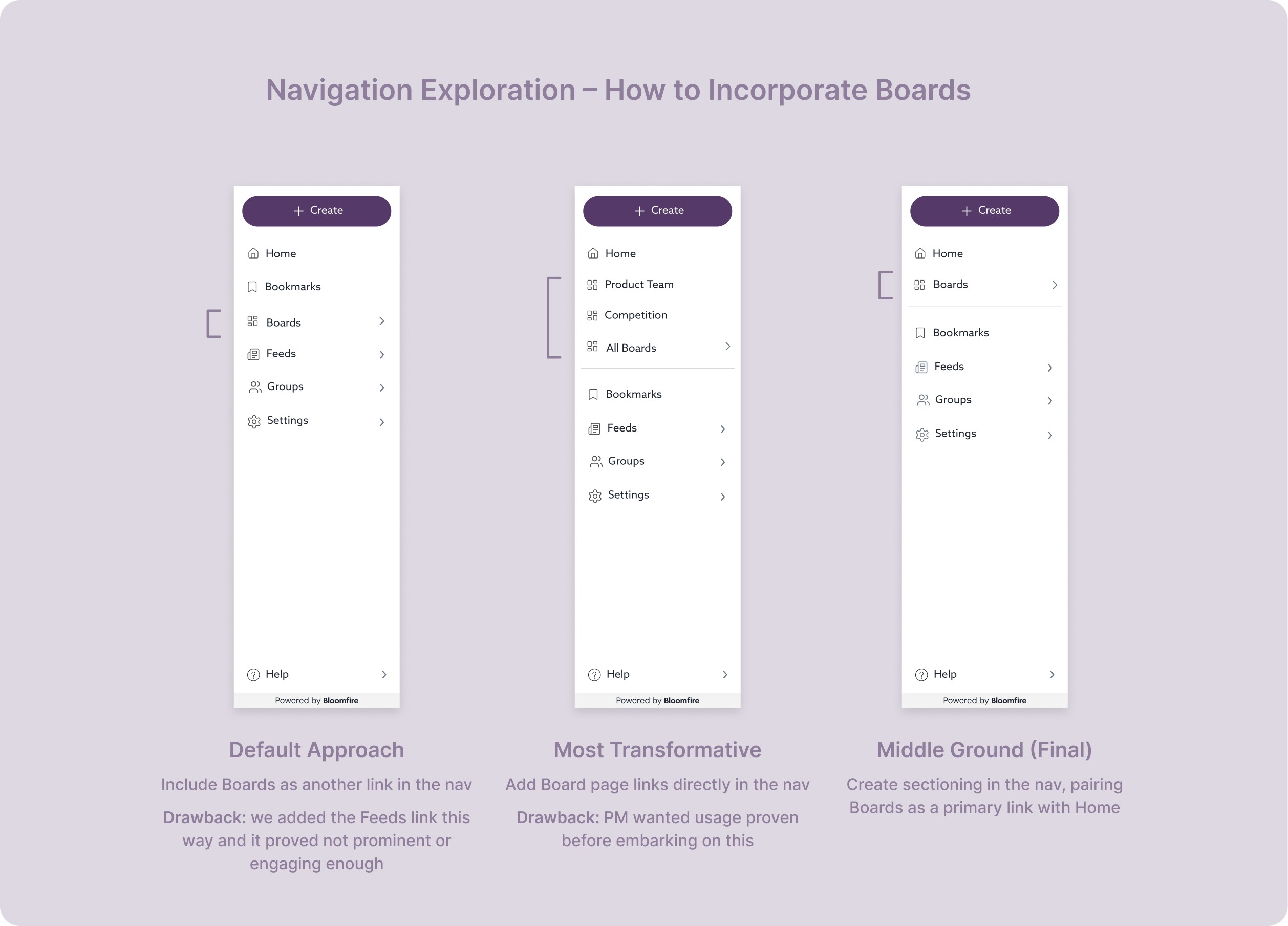
Search visibility was a major step forward, but I didn't think it was enough on its own. I wanted Boards to come to users, not the other way around. My proposal was to surface each user's starred Boards directly in the nav — persistent and visible, inspired by how Slack handles channels. It would have been transformative for how users navigated the platform.

The PM wanted to see usage data before committing to a nav overhaul of that scale — reasonable, even if my concern was that usage would be lower precisely because Boards weren't surfaced prominently enough. We landed on a middle ground: a dedicated Boards link in the nav directly below Home, separated by a horizontal rule. Not the full vision, but a meaningful step in the right direction.
The Line I Held: Search Visibility

When engineering scoped the work, they pushed back on the complexity of getting Boards into search results. The PM came to me: could we move it to v2?

I said no. In interview after interview, users had been explicit about needing to find things through search. A Board that couldn't be discovered that way wasn't a destination — it was just another page admins had to manually direct people to. The feature's entire premise depended on it.

We kept search visibility in v1. It shipped.

The Outcome

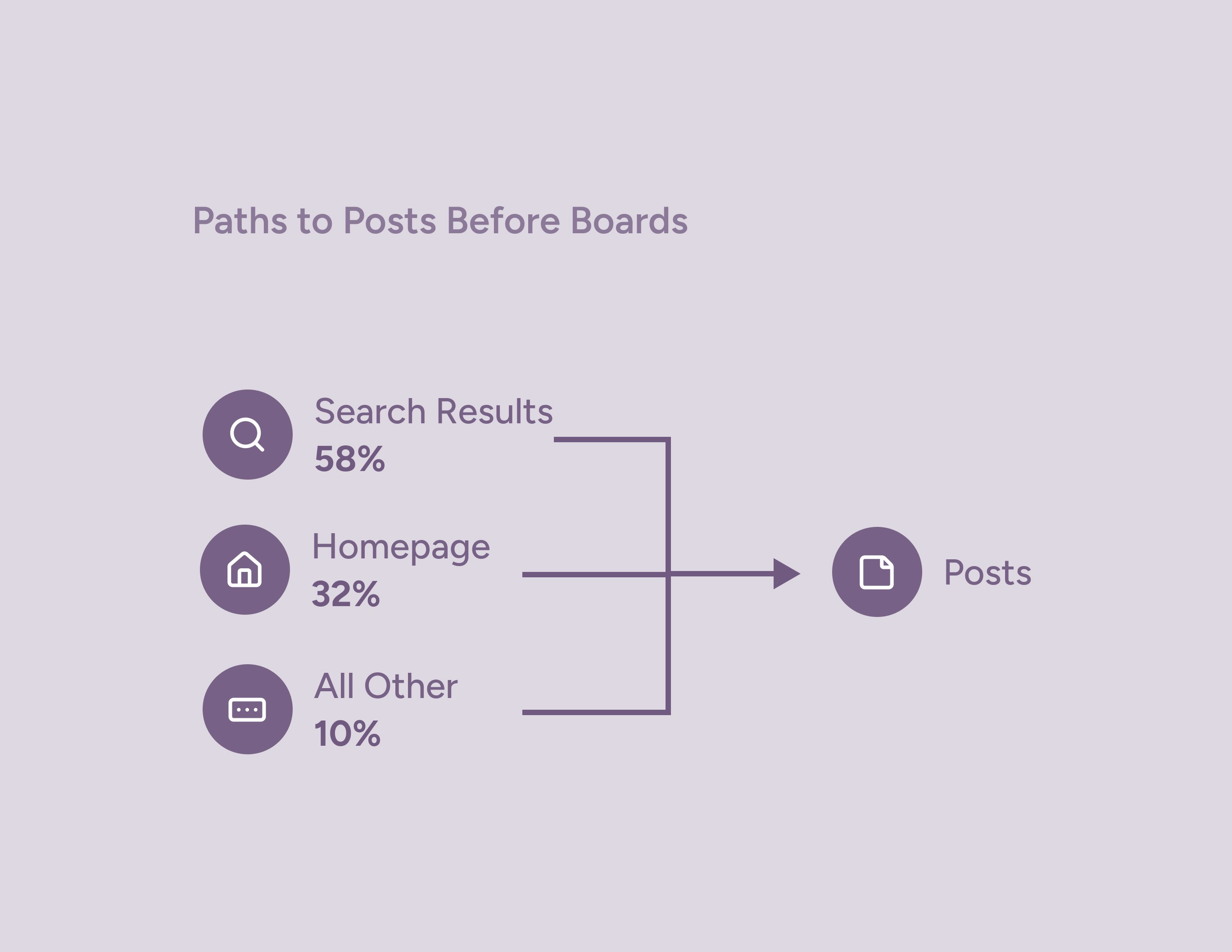
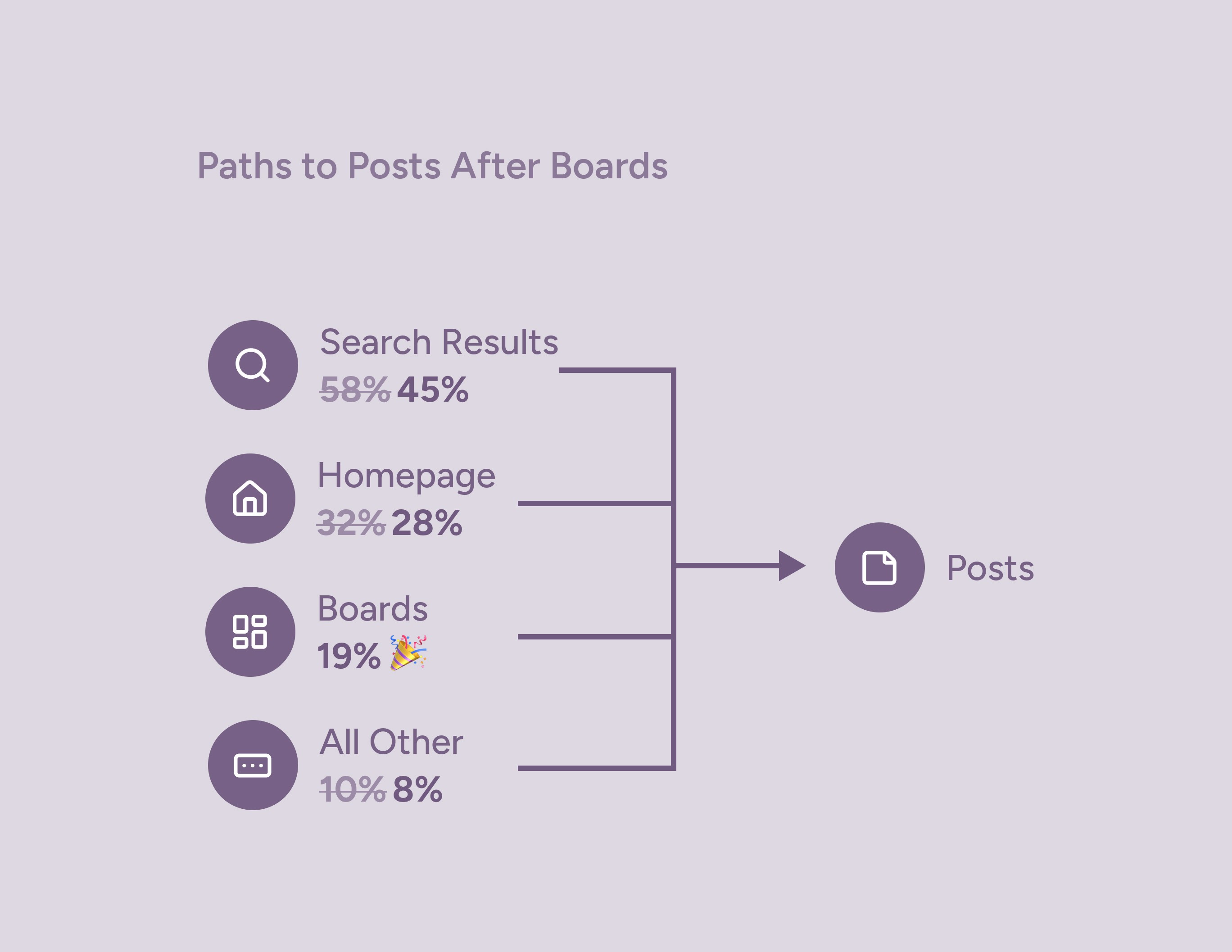
Boards shipped in 2025 and have seen strong adoption across the platform. [Exact metrics coming very soon!]

Phase 2: Boards — The Architectural Solution

The Insight That Drove It

Customers had been asking for this for a long time. Customer service managers regularly fielded requests on their behalf, and in my own interviews the excitement was consistent: organizations didn't just want a better homepage. They wanted dedicated spaces for different audiences, teams, and topics that felt like first-class destinations — searchable, permissioned, and built to last.

Homepage Builder was a proof of concept. Boards was the real answer.

What Boards Are

Boards are a new content type in Bloomfire — individual pages that carry the full compositional power of Homepage Builder, plus:

  • A name, cover photo, and description that make each Board feel like a real destination

  • Public or private permissions so the right audiences see the right content

  • Full search visibility — Boards surface in results, so users can find them without being told where to look

  • A dedicated spot in the nav, elevated above the rest

The homepage itself became the home Board — familiar to admins who had used Homepage Builder, but now one node in a larger network of destinations rather than the single entry point.

Solving Discoverability — and Learning From the Past

Feeds had failed partly because users couldn't find them — no search visibility, no notifications, no natural entry point. I was determined not to repeat that with Boards.

Search visibility was a major step forward, but I didn't think it was enough on its own. I wanted Boards to come to users, not the other way around. My proposal was to surface each user's starred Boards directly in the nav — persistent and visible, inspired by how Slack handles channels. It would have been transformative for how users navigated the platform.

The PM wanted to see usage data before committing to a nav overhaul of that scale — reasonable, even if my concern was that usage would be lower precisely because Boards weren't surfaced prominently enough. We landed on a middle ground: a dedicated Boards link in the nav directly below Home, separated by a horizontal rule. Not the full vision, but a meaningful step in the right direction.

The Line I Held: Search Visibility

When engineering scoped the work, they pushed back on the complexity of getting Boards into search results. The PM came to me: could we move it to v2?

I said no. In interview after interview, users had been explicit about needing to find things through search. A Board that couldn't be discovered that way wasn't a destination — it was just another page admins had to manually direct people to. The feature's entire premise depended on it.

We kept search visibility in v1. It shipped.

The Outcome

Boards shipped in 2025 and have seen strong adoption across the platform. [Exact metrics coming very soon!]

Phase 2: Boards — The Architectural Solution

The Insight That Drove It

Customers had been asking for this for a long time. Customer service managers regularly fielded requests on their behalf, and in my own interviews the excitement was consistent: organizations didn't just want a better homepage. They wanted dedicated spaces for different audiences, teams, and topics that felt like first-class destinations — searchable, permissioned, and built to last.

Homepage Builder was a proof of concept. Boards was the real answer.

What Boards Are

Boards are a new content type in Bloomfire — individual pages that carry the full compositional power of Homepage Builder, plus:

  • A name, cover photo, and description that make each Board feel like a real destination

  • Public or private permissions so the right audiences see the right content

  • Full search visibility — Boards surface in results, so users can find them without being told where to look

  • A dedicated spot in the nav, elevated above the rest

The homepage itself became the home Board — familiar to admins who had used Homepage Builder, but now one node in a larger network of destinations rather than the single entry point.

Solving Discoverability — and Learning From the Past

Feeds had failed partly because users couldn't find them — no search visibility, no notifications, no natural entry point. I was determined not to repeat that with Boards.

Search visibility was a major step forward, but I didn't think it was enough on its own. I wanted Boards to come to users, not the other way around. My proposal was to surface each user's starred Boards directly in the nav — persistent and visible, inspired by how Slack handles channels. It would have been transformative for how users navigated the platform.

The PM wanted to see usage data before committing to a nav overhaul of that scale — reasonable, even if my concern was that usage would be lower precisely because Boards weren't surfaced prominently enough. We landed on a middle ground: a dedicated Boards link in the nav directly below Home, separated by a horizontal rule. Not the full vision, but a meaningful step in the right direction.

The Line I Held: Search Visibility

When engineering scoped the work, they pushed back on the complexity of getting Boards into search results. The PM came to me: could we move it to v2?

I said no. In interview after interview, users had been explicit about needing to find things through search. A Board that couldn't be discovered that way wasn't a destination — it was just another page admins had to manually direct people to. The feature's entire premise depended on it.

We kept search visibility in v1. It shipped.

The Outcome

Boards shipped in 2025 and have seen strong adoption across the platform. [Exact metrics coming very soon!]

What This Project Taught Me

The most interesting design problems aren't usually the ones on the brief. The brief said "fix the homepage." The real problem was that the platform's information architecture assumed organizational homogeneity that didn't exist.

Getting from that insight to Boards took years — customer advocacy, a phased approach that built organizational confidence, and a willingness to treat the first solution as a stepping stone rather than a destination. That's the kind of design work I find most meaningful: not just making something easier to use, but understanding what the product needs to become.

What This Project Taught Me

The most interesting design problems aren't usually the ones on the brief. The brief said "fix the homepage." The real problem was that the platform's information architecture assumed organizational homogeneity that didn't exist.

Getting from that insight to Boards took years — customer advocacy, a phased approach that built organizational confidence, and a willingness to treat the first solution as a stepping stone rather than a destination. That's the kind of design work I find most meaningful: not just making something easier to use, but understanding what the product needs to become.

What This Project Taught Me

The most interesting design problems aren't usually the ones on the brief. The brief said "fix the homepage." The real problem was that the platform's information architecture assumed organizational homogeneity that didn't exist.

Getting from that insight to Boards took years — customer advocacy, a phased approach that built organizational confidence, and a willingness to treat the first solution as a stepping stone rather than a destination. That's the kind of design work I find most meaningful: not just making something easier to use, but understanding what the product needs to become.